Replacing Tableau with Streamlit on Snowflake, Built by Claude Code
BI is becoming software. Here's how we helped a client cancel Tableau and rebuild their executive-blessed metrics as Streamlit apps on Snowflake — scaffolded, validated, and shipped by Claude Code, version-controlled like any other code.
If there's one thing I keep hearing lately, it's that traditional BI applications like Tableau are in trouble. I usually dislike click-baity "X is dead, everyone is doing Y" headlines. They tend to be fearmongering, driven by the hype cycle. But in the case of BI, I believe deep down that it's true, or at least that BI is the part of the data landscape the AI rush will change most drastically.
In 2025, I helped a client get rid of their Tableau subscription entirely. Together, we'd connected their Claude Enterprise account to their data warehouse, and with a well-governed data model underneath, their entire org unlocked self-serve reporting. Employees were generating the insights they needed on the fly right in Claude chat, and sharing them with each other as artifacts. Still, leadership had one lingering itch: they wanted a "published" set of critical metrics, numbers "blessed" by the executive team as the source of truth. Normally that's exactly what they'd spin up Tableau for. But given the hefty price tag Tableau carries, they were still motivated to cut it, even with those published metrics to account for. This client was already on Snowflake, so I thought to myself... what if we just leveraged Streamlit? Sure, Streamlit isn't as user-friendly as the drag-and-drop canvas of traditional BI tools, but maybe we could abstract away the need to write Streamlit code by hooking it up to Claude Code. So that's exactly what we did.
First things first, here's a diagram of the whole end-to-end workflow:
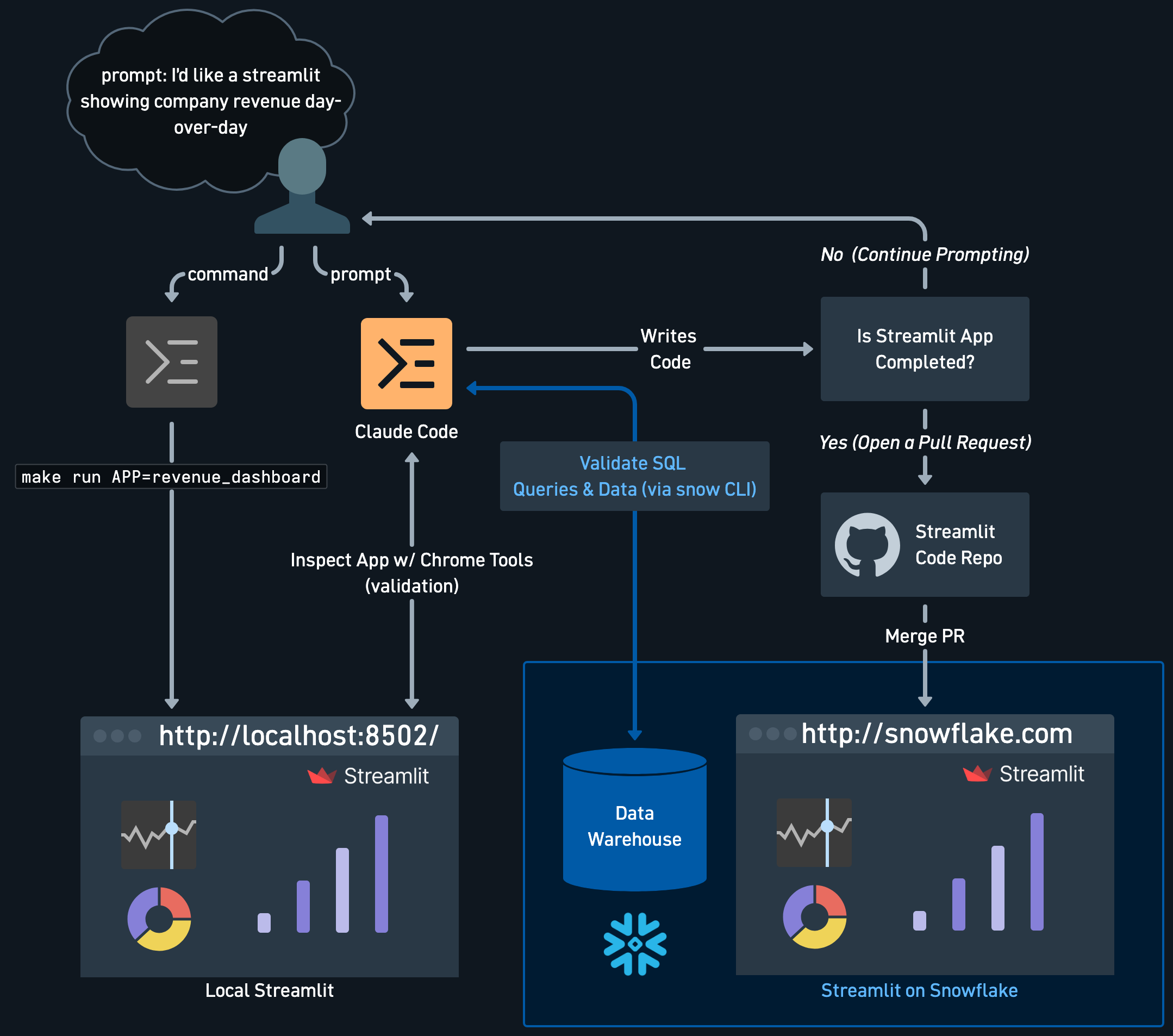
This article breaks down each of these sections, walking you through how we set the whole thing up.
Local setup
First and foremost, you'll need a terminal-based coding tool (Claude Code, Codex, Pi, etc.) that writes the code for you. Second, you'll need to install the snow CLI so that said terminal-based coding tool can query Snowflake the same way you do. Ensure you're authenticated to Snowflake by following these instructions.
In our repository, we created a Makefile so we could quickly spin up a Streamlit app locally to validate Claude Code as it made changes and updates. Our repo is structured accordingly:
streamlit-dashboards/
├── sample_report/              # the example app (clone this to start a new one)
│   ├── streamlit_app.py        # entry point: filters, tabs, connection test
│   ├── overview.py             # one tab
│   ├── category_breakdown.py   # another tab
│   ├── utils.py                # shared helpers (connection, header, sample data)
│   ├── app.yml                 # Snowsight title / author / comment
│   └── environment.yml         # the Streamlit-in-Snowflake environment
├── .snowflake/config.toml      # repo-local Snow CLI connection for local dev
├── snowflake/setup.sql         # one-time Snowflake provisioning (run once)
├── .github/workflows/
│   └── snowflake-sync.yml      # the auto-deploy pipeline
├── .claude/skills/new-streamlit/   # a /new-streamlit scaffolder for Claude Code
├── Makefile                    # make setup / make run / make lint
└── requirements.txt            # local dev dependencies
With the repo structured like this, a single make run APP=sample_report spins up the sample dashboard in your browser. The Makefile handles the boring parts: it builds a virtual environment, installs the dependencies, and wires up a repo-local Snowflake connection at .snowflake/config.toml so you never have to touch your global ~/.snowflake/config.toml. Run make setup once, and the first make run pops open a browser for SSO, caches the token, and every run after that is silent.
Here's where it gets fun. Once the app is running locally, Claude Code can actually see it. With the Claude in Chrome browser extension, it opens the app in a real Chrome tab and reads the rendered page and console (catching the tracebacks Streamlit surfaces on error, confirming a chart actually rendered), then loops back to fix whatever is broken. And because the snow CLI is authenticated, Claude validates its own SQL and sanity-checks the numbers straight against the warehouse while it works.
That's the whole local loop: I prompt, Claude writes the code, runs the app, looks at it, queries Snowflake to make sure the data is right, and keeps going until the dashboard holds up. I'm just the reviewer. The entire template is public if you want to clone it and follow along: github.com/chrishronek/streamlit-dashboards.
Snowflake setup
The trick that makes all of this work is a native Snowflake feature that doesn't get enough attention: the Git repository object. Snowflake can clone a GitHub repo into an internal stage and serve a Streamlit app directly from it. So "deploying" isn't a build-and-ship pipeline at all. It's just telling Snowflake to fetch the latest commit and point a Streamlit object at it.
Getting there takes a little one-time plumbing. I wrapped the whole thing in a single snowflake/setup.sql that you run once as ACCOUNTADMIN. Here's what it creates, and why:
- Two roles.
APP_ROLE_GITHUBis the identity CI logs in as, andAPP_ROLE_STREAMLITowns the Streamlit objects and holds read access to your data. We grant the second role to the first, so the deploy role can create apps that end up owned by the app role, the same ownership you'd get clicking around in Snowsight. - Two warehouses.
GITHUB_WHis a tiny XS warehouse that only runs CI's quick DDL, andSTREAMLIT_WHis what the apps themselves query on. - A service user. GitHub Actions can't sit through a browser SSO handshake, so the
GITHUBuser authenticates with a key pair (JWT) instead of a password. - The Git integration. An API integration scoped to your GitHub org, an optional secret holding a PAT (only needed for private repos), and the
GIT REPOSITORYobject itself, the thing Snowflake keeps in sync with your repo. - Grants to your data. Read access on whatever marts and staging schemas your dashboards query, so the apps actually have something to show.
The key pair sounds scarier than it is. Two openssl commands and you're done:
openssl genrsa 2048 | openssl pkcs8 -topk8 -inform PEM -out github_key.p8 -nocrypt
openssl rsa -in github_key.p8 -pubout -out github_key.pub
Paste the public key onto the GITHUB user, and hang on to github_key.p8. It becomes a GitHub secret in the next section. The fully-qualified name of the GIT REPOSITORY object (something like ANALYTICS.STREAMLIT.STREAMLIT_APPS_REPO) is the one value GitHub needs to know about, so keep it handy.
GitHub setup
With Snowflake primed, the last piece is teaching GitHub to push commits into it. Everything lives in one workflow file, .github/workflows/snowflake-sync.yml, plus a handful of repo settings.
Under Settings → Secrets and variables → Actions, you set a few variables and exactly one secret:
| Type | Name | What it is |
|---|---|---|
| Variable | SNOWFLAKE_ACCOUNT | Your account identifier, e.g. MYORG-ACCOUNT |
| Variable | SNOWFLAKE_GIT_REPO | FQN of the Git repository object from setup.sql |
| Variable (optional) | SNOWFLAKE_DATABASE / SNOWFLAKE_SCHEMA / SNOWFLAKE_QUERY_WAREHOUSE | Override where the apps live; sensible defaults otherwise |
| Secret | SNOWFLAKE_PRIVATE_KEY | Contents of your github_key.p8 |
The workflow runs three jobs on every push to main:
- Detect: diff the push to find which app directories actually changed. Only those get deployed, so a README tweak doesn't redeploy your whole fleet.
- Sync: run
snow git fetchso Snowflake's Git repository stage mirrors the new commit. - Deploy: for each changed app,
CREATE STREAMLIT IF NOT EXISTS(first time only), thenALTER STREAMLIT ... PULLto advance it to the fetched commit, and anALTER STREAMLIT ... SETto sync the title and comment from the app'sapp.yml.
The part I'm proud of: adding a new dashboard is just adding a directory. There's no workflow to edit and no object to pre-create. The Streamlit's name is derived from the folder, so sample_report/ becomes ANALYTICS.STREAMLIT.SAMPLE_REPORT automatically on the first push.
That's also where the Claude Code piece closes the loop. The repo ships a /new-streamlit skill that scaffolds a new app with every convention already in place: the dual-mode connection, the app.yml metadata, the parameterized database. So the full lifecycle looks like the diagram up top: prompt Claude for a dashboard, watch it build and validate locally, open a pull request, and once it's merged Snowflake is already serving the new version. Nobody logs into Snowsight to click anything.
Conclusion
When we set out to cancel that Tableau subscription, the one thing standing in the way was a published, executive-blessed set of metrics. What replaced it wasn't another BI tool. It was a Git repo, a Makefile, and Claude Code. The "blessed" dashboards now live in Streamlit on Snowflake, version-controlled and code-reviewed like any other software, and they got there without anyone hand-crafting a chart in a drag-and-drop canvas.
That's the shift I keep coming back to: BI is becoming software. Once your dashboards are just code in a repository, they inherit everything good about software: pull requests, reviews, CI/CD, a full history of who changed what and why, and an AI pair-programmer that can build and validate them for you. That's a very different world from a locked-down canvas behind a per-seat license.
The whole thing is open source, so you don't have to take my word for it. Clone github.com/chrishronek/streamlit-dashboards, run make setup, point it at your own Snowflake account, and prompt your way to a dashboard. Happy (self-serve) dashboarding! 🎈